In the preceding posts of our Zero Trust in EKS series, we’ve established a strong foundation by implementing workload identity with SPIFFE/SPIRE for East-West communication and enforcing network isolation with Kubernetes Network Policies, alongside data protection using AWS KMS and Secrets Manager. Our final deep dive will focus on two equally critical aspects: securing North-South traffic to AWS services using IAM Roles for Service Accounts (IRSA) and fortifying our Software Supply Chain to ensure that only trusted and verified code runs in our EKS clusters.
Cloud Identity: AWS IRSA for Least-Privilege Access to AWS Services
While SPIFFE/SPIRE excels at securing communication between workloads within the EKS cluster (East-West traffic), our applications often need to interact with external AWS services such as Amazon SQS, Amazon S3, or Amazon RDS. Traditionally, this was often handled by attaching an IAM role to the EC2 worker nodes, granting all pods on that node the permissions defined in the role. This approach, however, violates the principle of least privilege, as a compromised pod could inherit broad permissions, leading to a significant security breach.
AWS IAM Roles for Service Accounts (IRSA) revolutionizes this by allowing you to associate an IAM role directly with a Kubernetes Service Account. This means that only pods configured to use that specific service account can assume the IAM role, thereby gaining access to the AWS resources defined in the role’s policy. This provides granular, least-privilege access for your Kubernetes workloads to AWS services.
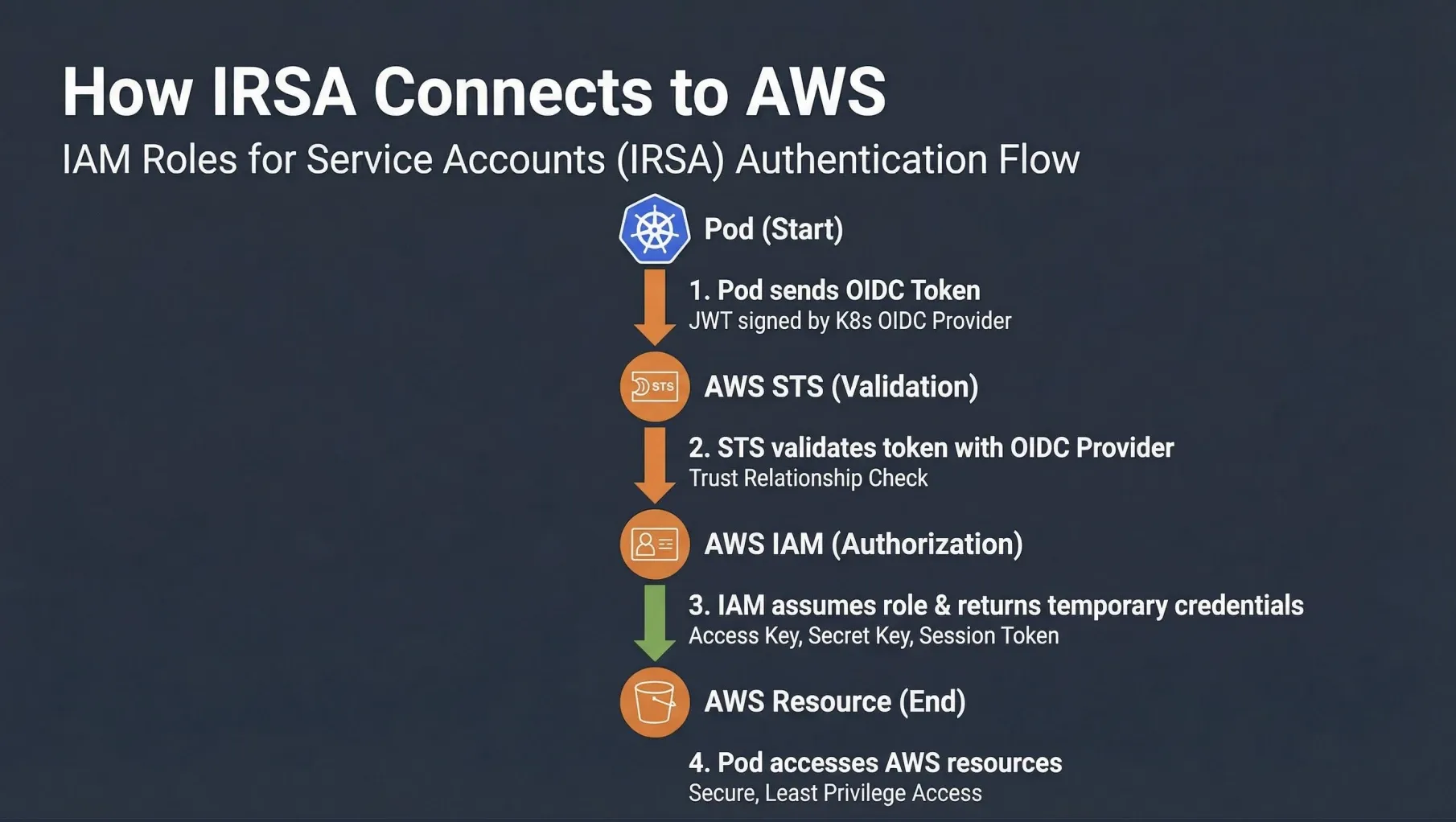
How IRSA Works:
- OIDC Provider: EKS clusters are configured with an OpenID Connect (OIDC) identity provider. This provider allows Kubernetes service accounts to authenticate with AWS IAM.
- Service Account Annotation: A Kubernetes Service Account is annotated with the Amazon Resource Name (ARN) of an IAM role.
- Pod Token: When a pod is launched using this service account, Kubernetes injects a projected service account token into the pod. This token is a JSON Web Token (JWT) signed by the EKS cluster’s OIDC provider.
- STS AssumeRoleWithWebIdentity: The application within the pod (e.g., using an AWS SDK) can then use this JWT to call the AWS Security Token Service (STS)
AssumeRoleWithWebIdentityAPI operation. AWS STS validates the JWT against the EKS cluster’s OIDC provider. - Temporary Credentials: If the JWT is valid and the IAM role’s trust policy allows it, AWS STS returns temporary AWS credentials (access key ID, secret access key, and session token) to the pod.
- AWS Resource Access: The application uses these temporary credentials to access the AWS resources it needs, with permissions limited by the associated IAM role.
IRSA in our Zero Trust EKS Demo
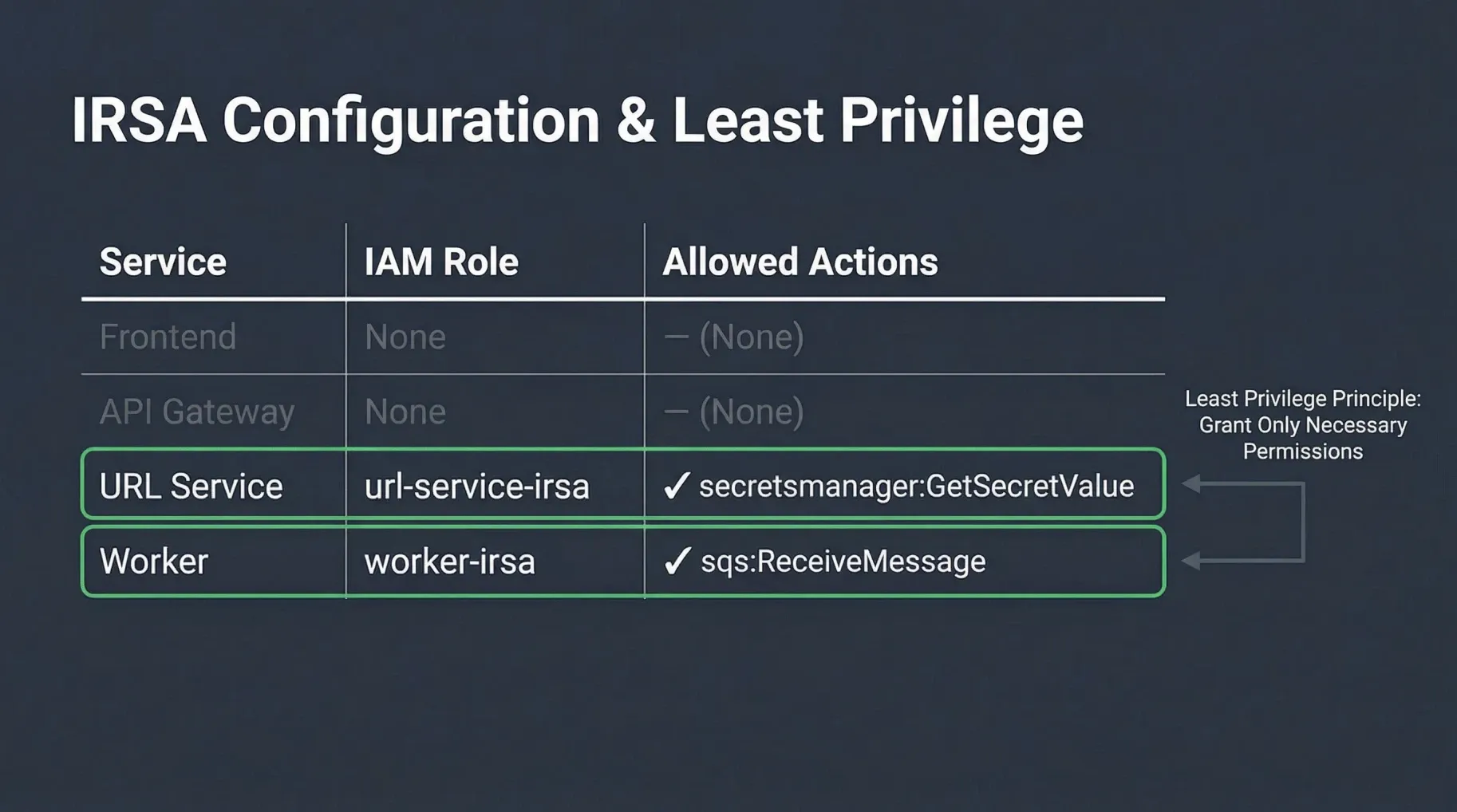
In our URL Shortener Demo, the worker service needs to interact with Amazon SQS to process messages, and the url-service needs to retrieve database credentials from AWS Secrets Manager. Both services leverage IRSA to obtain the necessary permissions.
Here’s how the worker service account is configured to assume an IAM role:
# zero-trust-eks-demo/kubernetes/identity/service-accounts.yaml
apiVersion: v1
kind: ServiceAccount
metadata:
  name: worker
  namespace: services
  annotations:
    # This annotation links the Kubernetes Service Account to an AWS IAM Role.
    # The IAM Role ARN is typically provisioned via Terraform.
    eks.amazonaws.com/role-arn: arn:aws:iam::<AWS_ACCOUNT_ID>:role/zero-trust-eks-worker-irsa
The corresponding IAM role (zero-trust-eks-worker-irsa) would have a trust policy allowing the EKS OIDC provider to assume it, and an inline policy granting only the necessary SQS permissions (e.g., sqs:ReceiveMessage, sqs:DeleteMessage) to its specific queue. This ensures that the worker pod has the absolute minimum permissions required for its function, adhering strictly to the principle of least privilege for North-South traffic.
Supply Chain Security: Ensuring Trust from Code to Cluster
Zero Trust principles extend beyond runtime security to encompass the entire software development lifecycle. A robust Software Supply Chain Security strategy is crucial to prevent malicious code or vulnerabilities from ever reaching your production EKS cluster. This involves verifying the integrity and authenticity of all components, from source code to deployed container images.
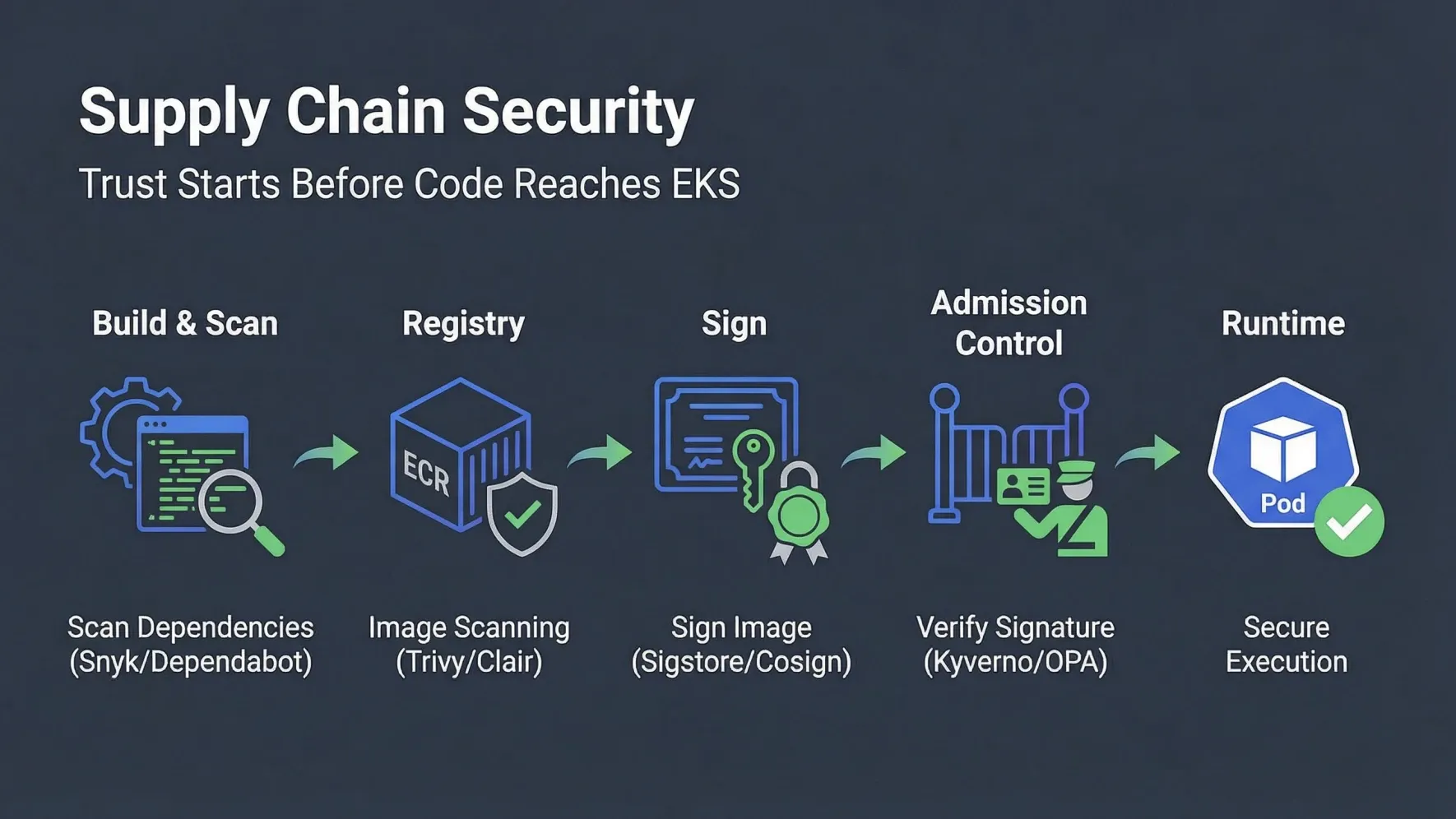
Key practices for securing your software supply chain in a Zero Trust EKS environment include:
-
Source Code Security:
- Vulnerability Scanning: Integrate tools like Snyk, Dependabot, or Trivy to scan your source code and dependencies for known vulnerabilities (CVEs) during development.
- Static Application Security Testing (SAST): Analyze source code for security flaws before compilation.
- Dynamic Application Security Testing (DAST): Test running applications for vulnerabilities.
-
Container Image Security:
- Image Scanning: Scan container images for vulnerabilities, misconfigurations, and sensitive data before pushing them to a registry. Tools like Trivy, Clair, or Amazon ECR’s built-in scanning can be used.
- Minimal Base Images: Use minimal, hardened base images to reduce the attack surface.
- Image Signing: Cryptographically sign your container images using tools like Sigstore/Cosign. This provides an immutable record of who built the image and verifies its integrity.
-
Registry Security:
- Private Registries: Store images in private, secure registries like Amazon ECR.
- Access Control: Implement strict IAM policies to control who can push and pull images from the registry.
-
Admission Control in Kubernetes:
- Policy Enforcement: Use Kubernetes Admission Controllers to enforce policies that prevent unsigned or unapproved images from being deployed to your cluster. Tools like Kyverno or Open Policy Agent (OPA) Gatekeeper can validate incoming resources against predefined policies (e.g., requiring images to be signed and from a trusted registry before admission).
By combining these supply chain security practices with the runtime protections covered in the previous posts — SPIFFE/SPIRE identity, Network Policies, and KMS encryption — we achieve a truly comprehensive Zero Trust posture that guards workloads from development all the way through to production execution.
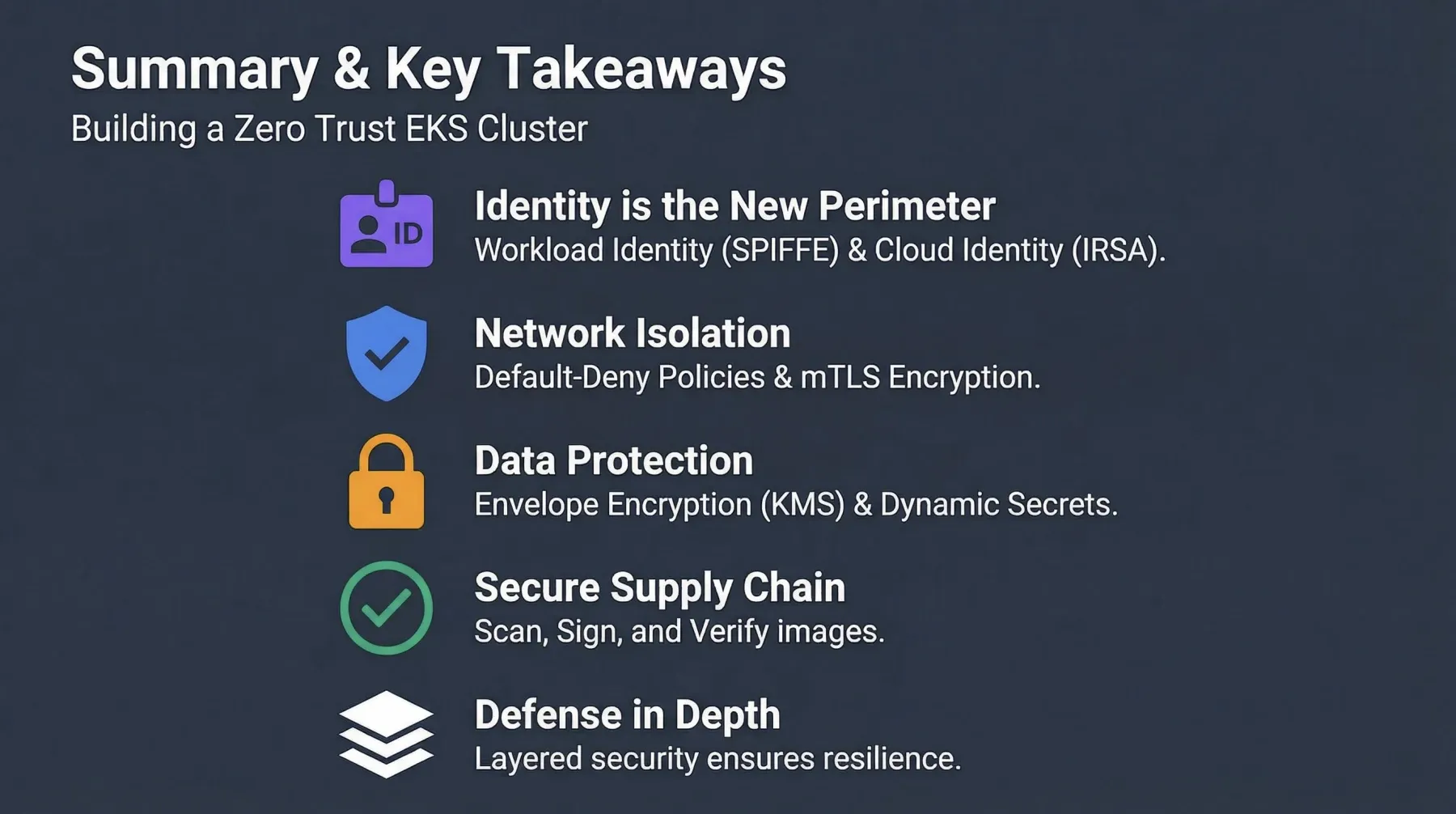
This concludes our Zero Trust in EKS series. We’ve journeyed through the fundamental principles, workload identity, network isolation, data protection, cloud identity, and supply chain security — a layered, defense-in-depth approach that embodies the Zero Trust philosophy. The Zero Trust EKS Demo brings all these concepts together in a practical, deployable reference architecture.
Feel free to share your thoughts, questions, or experiences implementing Zero Trust in your own Kubernetes environments in the comments below!