In our journey to build a Zero Trust architecture in Amazon EKS, we’ve already established the critical role of workload identity using SPIFFE/SPIRE for East-West communication. However, a truly resilient security posture requires multiple layers of defense. This post will delve into two more crucial layers: Network Isolation through Kubernetes Network Policies and Data Protection using AWS Key Management Service (KMS) and AWS Secrets Manager.
Network Layer: Implementing a “Default Deny” Posture with Kubernetes Network Policies
Even with strong workload identities, it’s prudent to enforce network-level controls to prevent unauthorized communication and limit the blast radius of a potential compromise. The principle of least privilege extends to the network, meaning that workloads should only be able to communicate with the specific services they need, and nothing more.
Kubernetes Network Policies are a powerful tool for achieving this micro-segmentation. They allow you to define rules that specify how pods are allowed to communicate with each other and with external network endpoints. A cornerstone of Zero Trust network security is the “Default Deny” posture.
The Default Deny Strategy
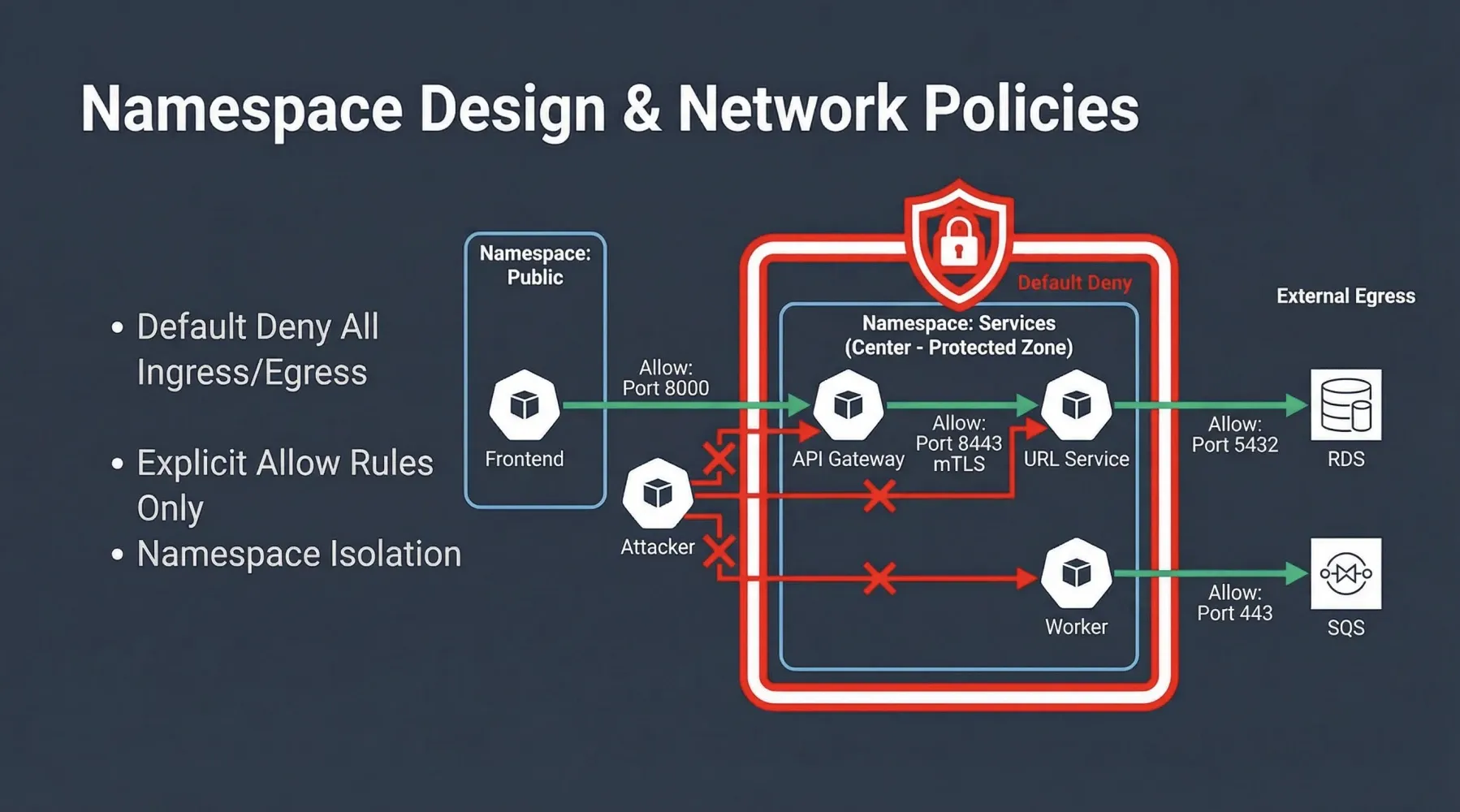
By applying a NetworkPolicy that denies all ingress and egress traffic to a namespace, you create a secure baseline. No pod within that namespace can communicate with any other pod (inside or outside the namespace) or any external service unless explicitly allowed. This forces you to think critically about every communication path and explicitly define it.
In our Zero Trust EKS Demo, we apply a default-deny-all policy to the services namespace:
# zero-trust-eks-demo/kubernetes/network-policies/00-default-deny-all.yaml
apiVersion: networking.k8s.io/v1
kind: NetworkPolicy
metadata:
  name: default-deny-all
  namespace: services
spec:
  podSelector: {}
  policyTypes:
    - Ingress
    - Egress
This policy, with an empty podSelector, applies to all pods within the services namespace. By specifying policyTypes: [Ingress, Egress], it ensures that both incoming and outgoing connections are blocked by default.
Explicitly Allowing Necessary Traffic
Once the default deny is in place, you must create specific NetworkPolicy resources to allow legitimate traffic flows. For instance, to enable communication from the frontend application (in the public namespace) to the api-gateway (in the services namespace) on TCP port 8000:
# zero-trust-eks-demo/kubernetes/network-policies/01-allow-frontend-to-api-gateway.yaml
apiVersion: networking.k8s.io/v1
kind: NetworkPolicy
metadata:
  name: allow-frontend-to-api-gateway
  namespace: services # This policy applies to pods in the 'services' namespace
spec:
  podSelector:
    matchLabels:
      app: api-gateway # Target: pods with label app: api-gateway
  ingress:
    - from:
        - namespaceSelector:
            matchLabels:
              kubernetes.io/metadata.name: public # Source: pods in 'public' namespace
          podSelector:
            matchLabels:
              app: frontend # Source: pods with label app: frontend
      ports:
        - protocol: TCP
          port: 8000 # Allowed port
This policy explicitly permits ingress traffic to api-gateway pods in the services namespace, but only from frontend pods in the public namespace, and only on port 8000. All other ingress traffic to api-gateway remains blocked. Similar policies are defined for other necessary communications, such as api-gateway to url-service (on port 8443, where mTLS is enforced), and egress rules for database or SQS access.
Network Policy enforcement can be handled by the AWS VPC CNI (with the Network Policy Agent enabled) or by third-party solutions like Cilium, which offers advanced L7 policy capabilities and eBPF-based enforcement.
Data Layer: Protecting Sensitive Data with Encryption and Secrets Management
Even with robust identity and network controls, data itself must be protected. In a Zero Trust model, we assume that data stores could be compromised, making encryption at rest and in transit paramount. Furthermore, the management of sensitive credentials (secrets) requires a secure, dynamic approach.
AWS KMS Envelope Encryption for Kubernetes Secrets
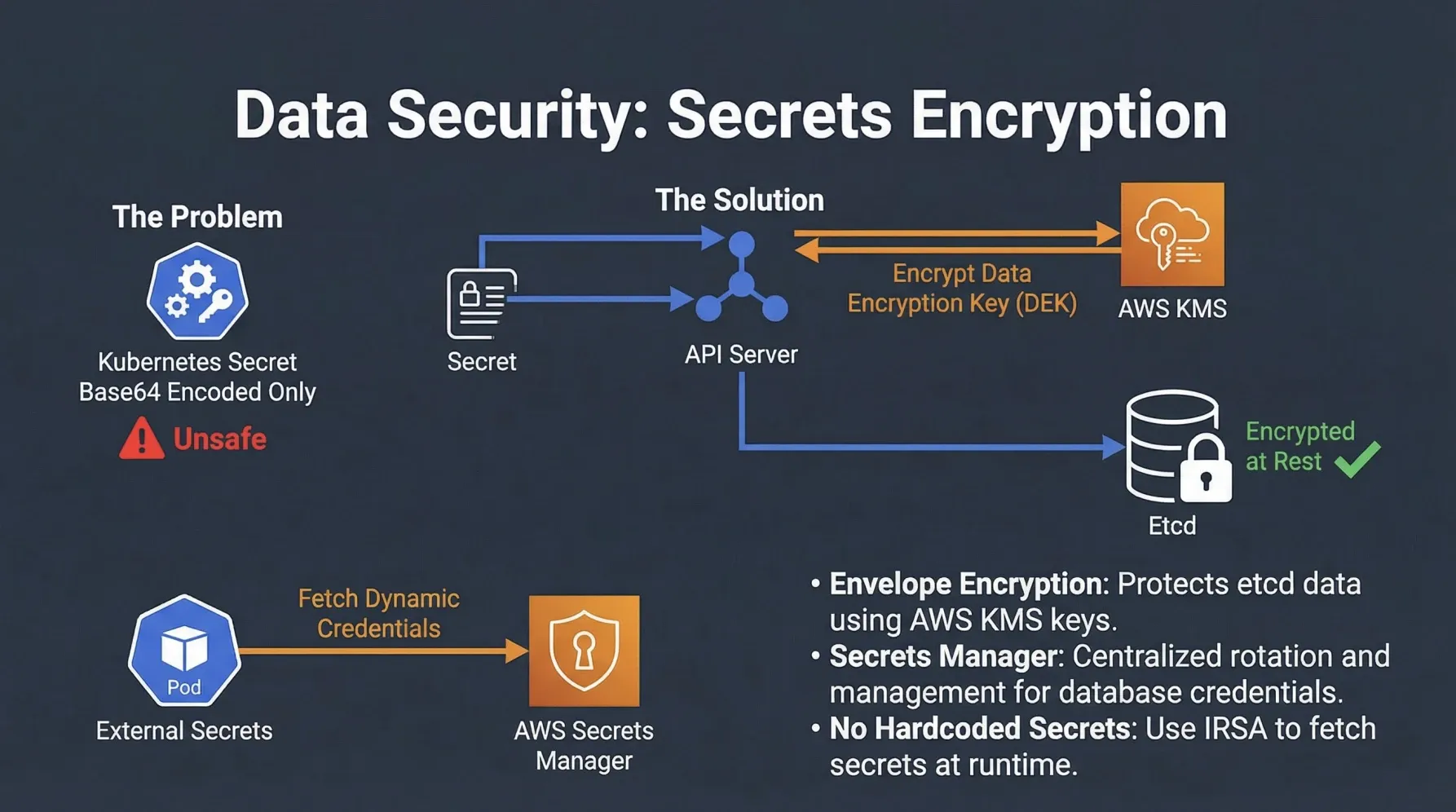
Kubernetes Secrets, by default, are only Base64 encoded, not encrypted, and are stored in etcd. This is a significant security risk. AWS KMS Envelope Encryption provides a solution by encrypting your Kubernetes Secrets using a Customer Managed Key (CMK) in AWS KMS before they are written to etcd.
Here’s how it works:
- When a Secret is created or updated, the EKS control plane generates a unique Data Encryption Key (DEK) for that Secret.
- The DEK is then encrypted by a CMK in AWS KMS (the Envelope Encryption).
- The encrypted DEK and the encrypted Secret data are stored in
etcd. - When the Secret is retrieved, the EKS control plane uses the CMK in KMS to decrypt the DEK, which then decrypts the Secret data.
This ensures that your sensitive data in etcd is always encrypted with a key that you control in KMS, adding a crucial layer of protection against unauthorized access to the etcd datastore.
Dynamic Secrets Management with AWS Secrets Manager
Storing long-lived credentials directly in Kubernetes Secrets, even if encrypted by KMS, still presents challenges related to rotation, auditing, and least privilege. A more secure approach is to use a dedicated secrets management service like AWS Secrets Manager.
AWS Secrets Manager allows you to:
- Store, manage, and retrieve database credentials, API keys, and other secrets securely.
- Automatically rotate secrets, reducing the risk of compromised long-lived credentials.
- Integrate with IAM to grant fine-grained access to secrets.
In our demo, the url-service needs to connect to an RDS PostgreSQL database. Instead of hardcoding credentials or storing them in a static Kubernetes Secret, it retrieves them dynamically from AWS Secrets Manager at runtime. This is achieved by leveraging AWS IRSA (IAM Roles for Service Accounts), which we will cover in detail in the next post.
Here’s a snippet from the url-service (Go) showing how it fetches database credentials from Secrets Manager:
// apps/url-service/main.go
func buildDbURI(ctx context.Context) (string, error) {
    secretArn := os.Getenv("DB_SECRET_ARN") // ARN of the secret in Secrets Manager
    if secretArn == "" {
        return "", errors.New("DB_SECRET_ARN environment variable not set")
    }

    // Load AWS configuration (credentials are provided via IRSA)
    cfg, err := config.LoadDefaultConfig(ctx)
    if err != nil {
        return "", fmt.Errorf("failed to load AWS config: %w", err)
    }

    // Create a Secrets Manager client
    sm := secretsmanager.NewFromConfig(cfg)
    // Retrieve the secret value
    out, err := sm.GetSecretValue(ctx, &secretsmanager.GetSecretValueInput{SecretId: &secretArn})
    if err != nil {
        // Handle errors like ResourceNotFoundException
        return "", fmt.Errorf("failed to get secret value for %s: %w", secretArn, err)
    }

    // Parse the secret string (assumed to be JSON)
    var sec dbSecret
    if err := json.Unmarshal([]byte(*out.SecretString), &sec); err != nil {
        return "", fmt.Errorf("failed to parse secret JSON: %w", err)
    }

    // Construct the PostgreSQL connection URI
    return fmt.Sprintf("postgres://%s:%s@%s:%d/%s", sec.Username, sec.Password, sec.Host, sec.Port, sec.Database), nil
}
This approach ensures that database credentials are never exposed in plaintext, are dynamically retrieved, and are managed with least privilege, significantly enhancing the data security posture.
The Synergy of Layers
The combination of Network Policies, KMS Envelope Encryption, and AWS Secrets Manager creates a powerful defense-in-depth strategy:
| Security Control | Layer | Benefit in Zero Trust EKS |
|---|---|---|
| Kubernetes Network Policies | Network (L3/L4) | Enforces micro-segmentation, prevents unauthorized lateral movement, and reduces attack surface by blocking all traffic by default. |
| AWS KMS Envelope Encryption | Data at Rest | Protects sensitive Kubernetes Secrets stored in etcd with customer-managed keys, even if etcd is compromised. |
| AWS Secrets Manager | Data Access | Provides dynamic, least-privilege access to credentials, enabling automated rotation and reducing the risk of hardcoded secrets. |
By meticulously implementing these controls, we move closer to a comprehensive Zero Trust environment where every interaction, whether network-based or data-related, is explicitly verified and secured. In our final post, we will complete our Zero Trust EKS series by exploring AWS IRSA for secure North-South communication and the crucial aspects of Supply Chain Security.
What are your thoughts on implementing network policies and managing secrets in EKS? Share your experiences in the comments below!