The problem: can’t sync forked github repository with master/upstream changes
While working with Github recently, I was facing a problem that – while I have forked a project repositorywhere I want to contribute but during the time I am working on the forked github repository**,**there may be some changes or major updates pushed on the master repository of the project by the original author or other collaborators. So, I need to sync my forked github repositorywith master repository of the project to get the latest changes.
The Solution
I love to contribute on open source projects on my leisure time. So, I used to fork projects on Github frequently which seems interesting to me and I feel I can contribute on. So, I was in need of a solution.
I have seen on Bitbucket, this can be done from their panel by just clicking on a single button. But in case of Github, there’s no option available. So, after searching on Google I’ve found the right way to sync my forked github repository with the original master repository. I am documenting the steps here on my blog for future reference 🙂
Sync forked github repository with master
First I need to set upstream remote by running the following command:
git remote add upstream https://github.com/techjewel/DevConByPHPxperts.git
In your case, you will need to change the repo url to your one.
Next, I will need to fetch the changes from upstream (master repo).
git fetch upstream
This will bring all the updated changes to upstream branch. Then I can merge the updates from upstream/master with my local forked master branch by running the following command:
git checkout master && git merge upstream/master
Great! Now my forked master branch has all the changes and updates from the original master branch of the repo I had forked.
Now I can just push the update to Github.
git push origin master
If I visit Github now, I will see that my forked repo is showing the following message:
This branch is even with techjewel:master.
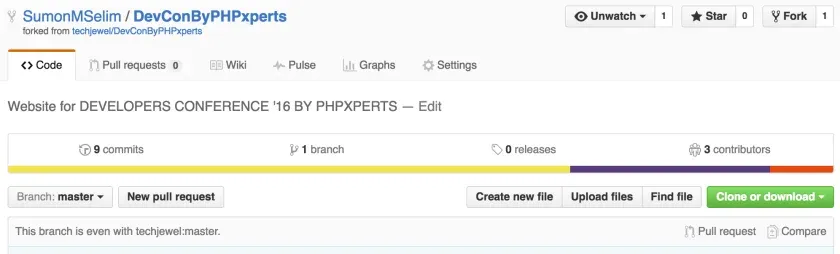
That was it. From now, every time if there is any new changes on the master repository of the project, I can easily sync them to my forked repository just by running the following command:
git fetch upstream && git checkout master && git merge upstream/master